文件与集合
通过 API 使用 Collections
本指南介绍如何使用 xAI SDK 和 REST API 以编程方式管理 collection。
创建 Management Key
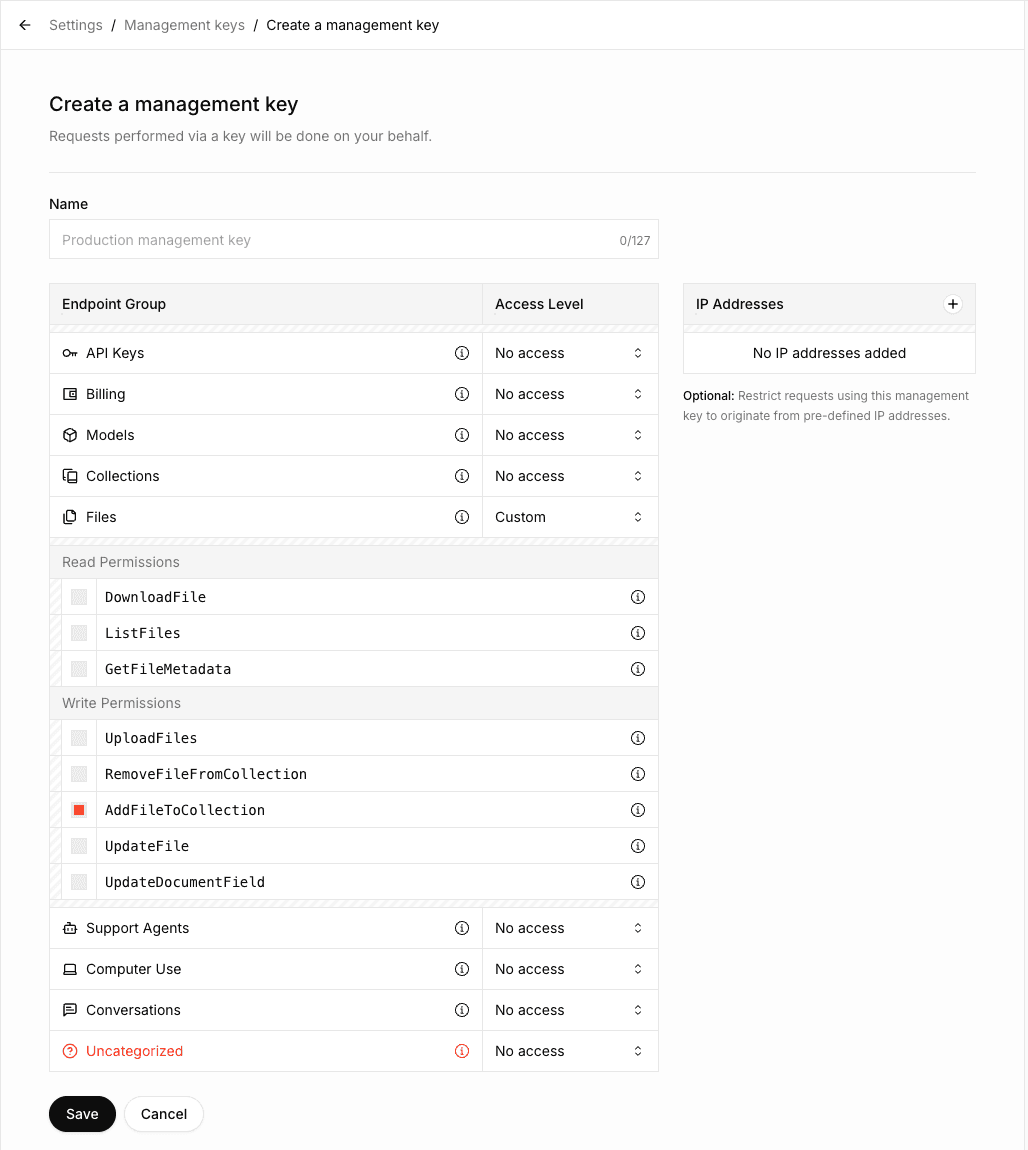
要使用 Collections API,需要创建具有 AddFileToCollection permission 的 Management API Key。向 collection 上传文档时必须具备该 permission。
前往 Management Keys,该 section 位于 xAI Console
点击 Create Management Key
选择
AddFileToCollectionpermission,以及所需的其他 permission如果需要执行上传文档以外的操作(例如创建、更新或删除 collection),请在 Collections Endpoint group 中启用相应 permission
复制并安全保存 Management API Key
创建 Collection
import os
from xai_sdk import Client
client = Client(
    api_key=os.getenv("XAI_API_KEY"),
    management_api_key=os.getenv("XAI_MANAGEMENT_API_KEY"),
    timeout=3600,
)

collection = client.collections.create(
    name="SEC Filings",
)

print(collection)列出 Collection
# ... Create client
collections = client.collections.list()
print(collections)查看 Collection 配置
# ... Create client
collection = client.collections.get("collection_dbc087b1-6c99-493d-86c6-b401fee34a9d")

print(collection)更新 Collection 配置
# ... Create client
collection = client.collections.update(
    "collection_dbc087b1-6c99-493d-86c6-b401fee34a9d",
    name="SEC Filings (New)"
)

print(collection)上传文档
向 collection 上传文档分为两个步骤:
将文件上传到 xAI API
将已上传文件添加到 collection
# ... Create client
with open("tesla-20241231.html", "rb") as file:
    file_data = file.read()

document = client.collections.upload_document(
    collection_id="collection_dbc087b1-6c99-493d-86c6-b401fee34a9d",
    name="tesla-20241231.html",
    data=file_data,
)
print(document)使用 Metadata 字段上传
如果 collection 定义了 metadata 字段(创建或更新 collection 时,必须在 field_definitions 中设置这些字段,详情请参阅链接的 metadata 页面),请使用 fields 参数提供这些字段:
# ... Create client
with open("paper.pdf", "rb") as file:
    file_data = file.read()

document = client.collections.upload_document(
    collection_id="collection_dbc087b1-6c99-493d-86c6-b401fee34a9d",
    name="paper.pdf",
    data=file_data,
    fields={
        "author": "Sandra Kim",
        "year": "2024",
        "title": "Q3 Revenue Analysis"
    },
)
print(document)搜索文档
还可以通过 Responses API 使用 file_search tool 搜索文档。更多信息请参阅 Collections Search Tool 指南。
# ... Create client
response = client.collections.search(
    query="What were the key revenue drivers based on the SEC filings?",
    collection_ids=["collection_dbc087b1-6c99-493d-86c6-b401fee34a9d"],
)
print(response)搜索模式
提供三种搜索方式:
Keyword search
Semantic search
Hybrid search(结合 keyword 与 semantic 两种方式)
系统默认使用 hybrid search,通常可提供最佳且最全面的结果。
| 模式 | 说明 | 最适合 | 缺点 |
|---|---|---|---|
| Keyword | 搜索指定单词、短语或数字的精确匹配 | 精确术语(例如账号、日期、特定财务数字) | 可能遗漏 context 相关内容 |
| Semantic | 理解含义和 context,以查找概念相关内容 | 即使具体用词不同,也能发现一般概念、主题或意图 | 对特定术语的精确度较低 |
| Hybrid | 结合 keyword search 和 semantic search,获得更广泛且更准确的结果 | 大多数实际使用场景 | 延迟略高 |
Hybrid 方式兼顾 precision 和 recall,因此是大多数 query 的推荐默认选择。
设置 hybrid mode 的示例:
curl https://api.x.ai/v1/documents/search \
  -H "Content-Type: application/json" \
  -H "Authorization: Bearer $XAI_API_KEY" \
  -d '{
      "query": "What were the key revenue drivers based on the SEC filings?",
      "source": {
          "collection_ids": [
              "collection_dbc087b1-6c99-493d-86c6-b401fee34a9d"
          ]
      },
      "retrieval_mode": {"type": "hybrid"}
}'
可以设置 "retrieval_mode": {"type": "keyword"} 使用 keyword search,设置 "retrieval_mode": {"type": "semantic"} 使用 semantic search。
删除文档
# ... Create client

client.collections.remove_document(
    collection_id="collection_dbc087b1-6c99-493d-86c6-b401fee34a9d",
    file_id="file_55a709d4-8edc-4f83-84d9-9f04fe49f832",
)删除 Collection
# ... Create client

client.collections.delete(collection_id="collection_dbc087b1-6c99-493d-86c6-b401fee34a9d")